
I absolutely fell in love with using Microsoft’s VScode for writing Powershell Scripts. One of the best features is the ability to import custom modules into the Intellisense feature.
It can be a simple or complicated script. Luc does a great job with his script to capture all kinds of options for PowerCLI on his blog. But what about other modules you might want to use?
Simply add them to the script located here (you might need to create it first):
C:\Users\<USERNAME>\Documents\WindowsPowershell\Microsoft.VSCode_profile.ps1
Here is my example profile script:
Function Enable-Modules
{
Get-module -listavailable vmware* | Import-Module
Import-Module C:\OPEN_PROJECTS\PowerLumber\PowerLumber.psm1
Import-Module C:\OPEN_PROJECTS\PowerWamp\powerWamp.psm1
}
Enable-Modules
That’s it, 7 lines and I have import a ton of functions that will help me speed up the rate at which I can write custom code/scripts. With the newer versions of VScode it is not necessary to update your preferences to load a powershell profile. It just loads it by default now. Oh, of course this does require the powershell plugin!
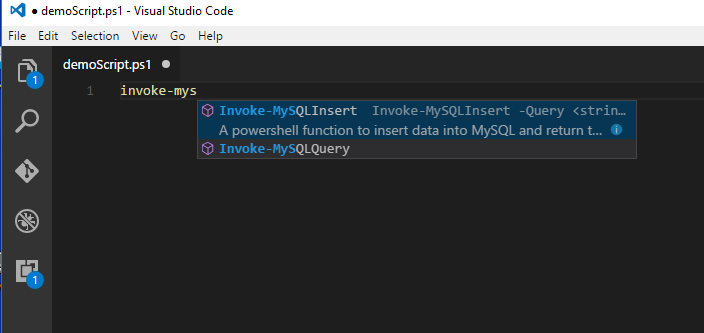
Once you create your Profile script to import your specified modules, simply reload VScode. Open a Powershell file, and witness the magic. See below, the ‘Invoke-MySQLInsert’ is a function from one of my imported modules PowerWamp.
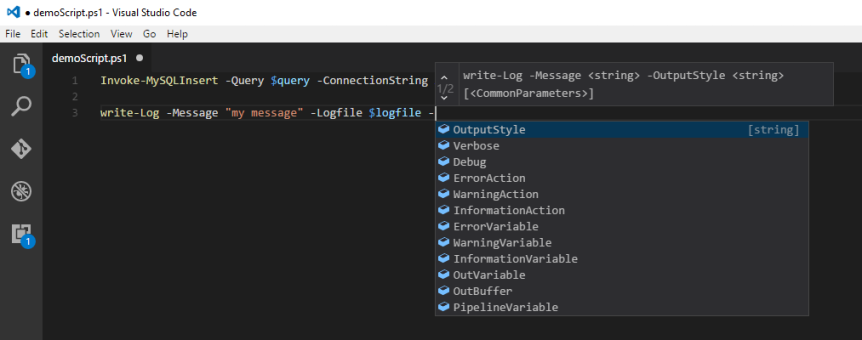
And this shows my other custom module PowerLumber:
Think about how much time ‘tab’ completion saves you in the console, and its available in VScode!
 Invoke-Automation
Hii great reading your blog
LikeLike